How to Choose an Embedded Barcode Scanner Engine for Self-Service Kiosks
Oct. 14, 2026
Share:
Choosing an Embedded Barcode Scanner Engine for a self-service kiosk requires more than comparing scan speed or barcode support. Kiosk buyers must balance scan performance, mounting space, user experience, software integration, durability, security, serviceability, and total cost. This guide from WCMI provides a practical selection process for retail, healthcare, transportation, hospitality, and other unattended kiosk applications.
Start with the kiosk use case and purchasing requirements
Identify who will use the kiosk and what they will scan
The correct scanner engine depends on the people, products, and operating environment involved. A retail checkout kiosk may scan printed product labels and mobile coupons, while a hospital check-in kiosk may scan patient wristbands, identity documents, or appointment codes.
Before requesting quotations, document the complete scanning scenario:
Users: customers, employees, patients, travelers, or warehouse operators.
Barcode types: 1D, 2D, QR Code, Data Matrix, PDF417, Aztec, Code 128, EAN, UPC, Code 39, and other required formats.
Scanning distance: contact scanning, short range, or scanning from several inches away.
Scanning angle: straight-on presentation, side presentation, or multiple angles.
Expected daily scan volume and peak-hour scan volume.
Available power, communication, and physical mounting space.
Required uptime, service life, and replacement process.
Translate stakeholder pain points into measurable specifications
The purchasing group usually includes product managers, mechanical engineers, electrical engineers, software developers, operations teams, finance staff, and service personnel. Each group evaluates the scanner differently.
Product managers need a consistent and fast customer experience.
Mechanical engineers need a compact engine with flexible mounting and a suitable scan window.
Electrical engineers need stable voltage, acceptable power consumption, and reliable signal interfaces.
Software developers need clear commands, status feedback, SDK support, and stable operating system compatibility.
Operations teams need dependable scanning during long hours and busy periods.
Finance teams need predictable acquisition, integration, maintenance, and replacement costs.
Service teams need easy access, diagnostic information, and a dependable supply of replacement units.
Convert vague requirements into measurable targets. For example, replace "fast scanning" with "the scanner must decode a typical mobile QR Code within two seconds in normal kiosk lighting." Replace "small size" with a maximum width, height, depth, and cable exit requirement.
Compare the scanner engine specifications that affect kiosk performance
Evaluate 1D and 2D decoding capability
A kiosk should support every barcode type required during its expected service life. Selecting a 1D-only engine can create an expensive redesign if the business later introduces mobile coupons, digital receipts, loyalty codes, or ticketing functions.
Select a 1D engine only when the application is limited to linear barcodes and future expansion is unlikely.
Select a 2D area-imaging engine when the kiosk must read QR Code, Data Matrix, PDF417, or barcodes displayed on mobile screens.
Confirm whether the engine supports poorly printed, low-contrast, truncated, or damaged codes.
Confirm whether the engine can read barcodes behind protective film or through a kiosk window.
Check whether special symbologies require a license or configuration charge.
Review scan speed, motion tolerance, and read range
Published scan speed alone does not describe the user experience. A kiosk scanner must acquire a code quickly when a user presents it at an imperfect angle or moves it slightly.
Review these specifications in the actual kiosk configuration:
Decode time for printed and electronic barcodes.
Motion tolerance when users move a phone or ticket during scanning.
Field of view at the planned scanning distance.
Minimum and maximum supported barcode size.
Depth of field for near and far presentations.
Performance with glossy labels, curved packages, and reflective screens.
Time required to recover after an unsuccessful scan.
Check lighting, aiming, and user feedback
Self-service users need clear confirmation that their barcode was detected. A good kiosk design combines the scanner engine with visible aiming, acoustic feedback, screen instructions, and a short success message.
Check whether the engine includes an aimer suitable for the planned scan window.
Confirm that the aimer remains visible under bright ambient light.
Evaluate illumination color and intensity for customer comfort.
Confirm that the engine can provide a decode signal to the kiosk controller.
Use the kiosk display and sound system to confirm successful and failed scans.
Prevent repeated reads by adding a configurable duplicate-read delay.
Verify the mechanical and electrical fit before ordering
Measure the physical installation area
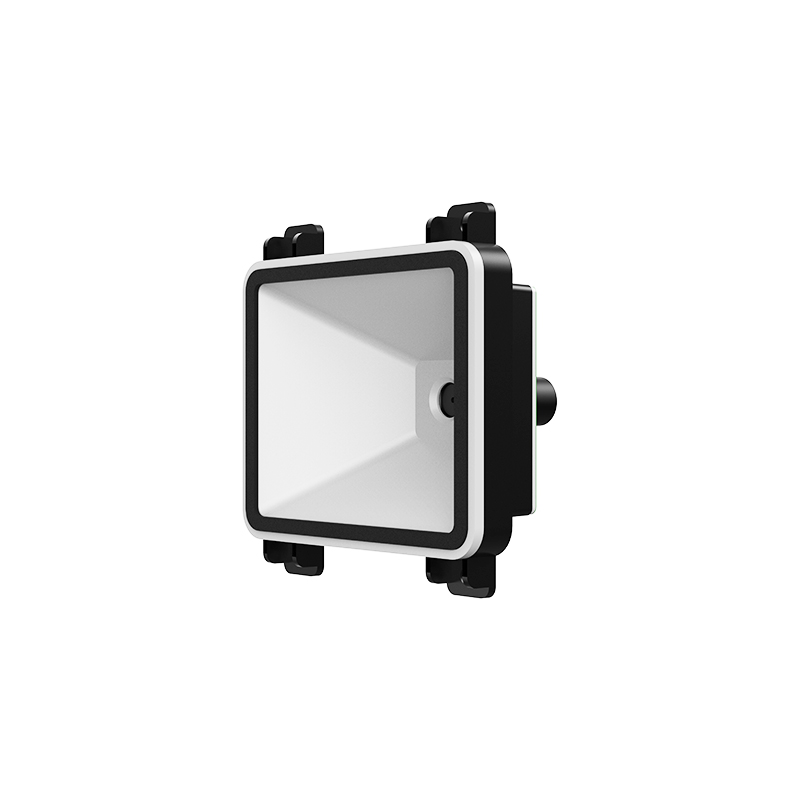
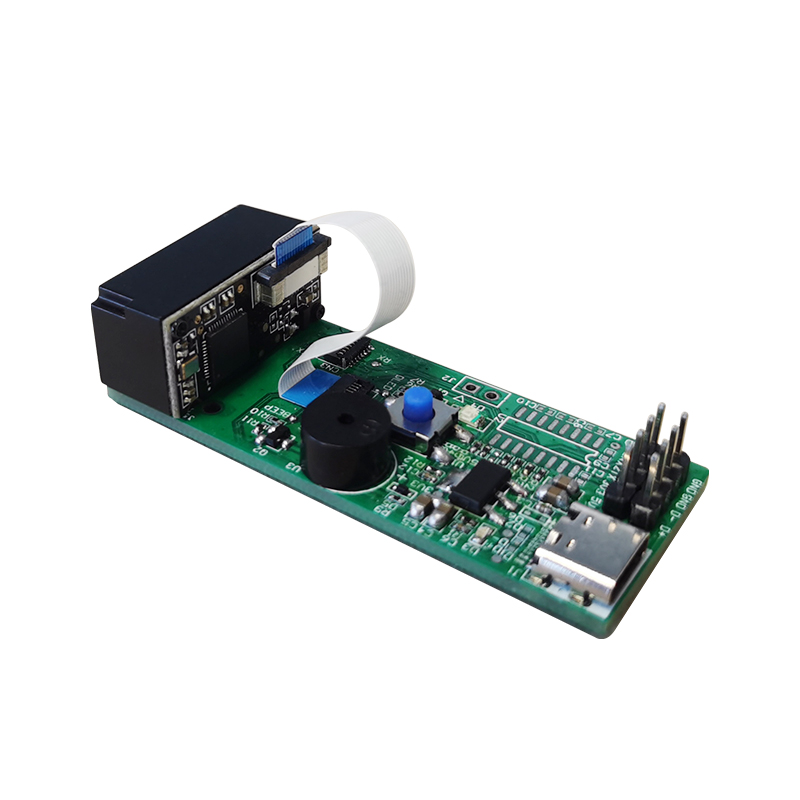
An engine can meet every decoding requirement and still fail during integration because of its dimensions, cable direction, lens position, or mounting holes. Obtain a mechanical drawing or evaluation unit before finalizing the kiosk enclosure.
Record the following measurements:
Engine length, width, and height.
Lens or scan window position relative to the mounting surface.
Mounting hole location and fastener type.
Cable connector location and minimum bend radius.
Required distance between the lens and the external kiosk window.
Available ventilation and heat dissipation space.
Clearance for service access and replacement.
Check the scan window and enclosure design
The kiosk window is part of the optical system. A dark, tinted, thick, scratched, or reflective window can reduce performance even when the scanner engine performs well in an open test.
Use an optically suitable window material recommended by the scanner supplier.
Avoid unnecessary thickness between the lens and the user barcode.
Reduce glare from overhead lighting and the kiosk display.
Keep the window clean and protect it from scratches.
Use a bezel or recess to reduce direct sunlight entering the optical path.
Confirm that the window does not block the full field of view.
Confirm power, interface, and environmental specifications
Verify the electrical requirements against the kiosk controller and power supply. The scanner engine may need a dedicated regulator, interface board, or cable assembly.
Input voltage range and current consumption.
Startup current and behavior during voltage fluctuation.
Supported interfaces such as USB, UART, TTL, or other communication methods.
Logic voltage levels and connector pin assignment.
Operating and storage temperature range.
Humidity, vibration, shock, and electrostatic discharge requirements.
Electromagnetic compatibility requirements for the complete kiosk.
Test the scanner engine in a realistic kiosk environment
Required tools for evaluation
A structured test avoids choosing a scanner from a datasheet alone. Prepare the following tools before testing:
Engineering sample or evaluation kit of the proposed scanner engine.
Target kiosk controller, computer, or single-board computer.
Required interface cables, adapters, and power supply.
Prototype scan window and planned mounting bracket.
Printed samples of every required barcode type.
Smartphones with different screen sizes, brightness levels, and operating systems.
Labels with different sizes, colors, print quality, and surface finishes.
Light meter or a practical set of bright, dim, and backlit conditions.
Ruler or measurement tool for read-range testing.
Computer software or a terminal program for command and data testing.
Logging software for recording decode time, failures, and communication errors.
Prototype glass or plastic window matching the final kiosk design.
First step: create a requirements and test matrix
List every barcode and operating condition that must pass. Assign an expected result and acceptance threshold to each test.
Test category
Example acceptance target
Printed 1D barcode
Successful decode in the normal presentation area
Printed 2D barcode
Successful decode at multiple angles
Mobile QR Code
Successful decode at low and high screen brightness
Damaged barcode
Acceptable performance within the defined damage limit
Bright ambient light
No unacceptable increase in failed reads
Scan window installed
Performance remains within the project target
Continuous operation
No overheating, freezing, or communication loss
Second step: test printed and electronic barcodes
Connect the scanner engine to the intended controller and power source.
Install the engine at the planned height, angle, and distance.
Scan clean printed barcodes in the center and at the edges of the scan area.
Repeat the test with small, large, curved, glossy, faded, and damaged labels.
Scan QR Code and other 2D codes from multiple smartphones.
Test low brightness, high brightness, screen protectors, and dark mode.
Record time to decode, failed attempts, duplicate reads, and user repositioning.
Third step: test lighting, temperature, and continuous operation
Test under normal indoor lighting.
Test with strong overhead lighting and direct light near the scan window.
Test with a bright kiosk display positioned near the scanner.
Operate the scanner continuously during a representative peak workload.
Measure enclosure temperature near the engine and controller.
Restart the kiosk repeatedly to verify reliable initialization.
Disconnect and reconnect the communication interface to check recovery behavior.
Review logs for timeouts, corrupted data, and unexpected duplicate results.
Confirm software integration and kiosk control functions
Check the communication protocol and data format
The scanner engine must communicate reliably with the kiosk software. Confirm whether the engine sends decoded data as keyboard input, serial data, USB data, or messages through a dedicated SDK.
Document the command used to trigger a scan.
Document the response sent after a successful decode.
Document timeout, no-read, and hardware-error responses.
Confirm character encoding and termination characters.
Confirm how the software distinguishes a new scan from repeated data.
Confirm whether settings remain stored after a power cycle.
Check whether firmware updates can be performed in the field.
Design the user flow around scan success and failure
Users should not have to guess whether to move the barcode closer, farther away, or at another angle. Build clear instructions into the kiosk interface.
Display where the user should present the barcode.
Activate the aimer or illumination when scanning begins.
Provide immediate visual or acoustic confirmation after a successful read.
Show a short instruction after a failed read rather than displaying a technical error.
Prevent the same barcode from being accepted twice unless the workflow requires it.
Provide a timeout and a clear path to retry or request assistance.
Log scan failures without storing unnecessary personal information.
Review security and privacy requirements
Barcode data may contain order information, membership identifiers, tickets, or healthcare-related information. The scanner engine should support the security design of the complete kiosk.
Restrict configuration access to authorized technicians.
Protect communication between the scanner and kiosk controller where required.
Prevent unauthorized barcode formats from triggering sensitive functions.
Validate decoded data in the kiosk application before processing it.
Avoid displaying full personal or transaction information on the public screen.
Define a secure firmware update and maintenance process.
Evaluate durability, service, supply, and total cost
Assess the complete cost of ownership
The lowest unit price may not produce the lowest project cost. A scanner that needs custom integration, frequent replacement, or extensive troubleshooting can increase the total cost significantly.
Unit price at prototype, pilot, and production quantities.
Evaluation kit, cable, interface board, and mounting accessory costs.
Engineering time for mechanical and software integration.
Cost of kiosk window changes or enclosure redesign.
Warranty terms and repair or replacement procedures.
Firmware maintenance and technical support costs.
Expected service life and failure rate.
Inventory cost for spare engines and replacement parts.
Shipping time and regional availability.
Verify durability for unattended operation
A self-service kiosk is exposed to repeated public use. Users may press objects against the scan window, touch the bezel, spill liquids, or operate the kiosk in dusty locations.
Ask the supplier for evidence related to:
Operating temperature and humidity.
Vibration and shock resistance.
Electrostatic discharge performance.
Ingress protection of the completed scanner assembly.
Lens and window cleaning compatibility.
Expected scan cycles and continuous operating limits.
Product change notification and long-term availability.
Confirm supplier support and production readiness
Purchasing teams should evaluate the supplier as carefully as the scanner hardware. A technically suitable engine can still create project risk if documentation, samples, or production support are unavailable.
Availability of mechanical drawings, electrical documents, and programming guides.
Response time for technical questions and failure analysis.
Ability to provide custom firmware or configuration support.
Sample availability for prototype and pilot builds.
Production capacity and lead time.
Quality control and traceability procedures.
Warranty, return, and replacement policy.
Support for regional compliance and customer documentation.
Follow a step-by-step selection and approval process
Fourth step: create a shortlist
Remove scanner engines that do not support the required barcode types.
Remove models that exceed the available mounting space.
Remove models that do not support the kiosk controller interface.
Compare scan performance with printed and mobile barcodes.
Compare environmental ratings and continuous-use capability.
Compare supplier documentation, support, lead time, and warranty.
Keep at least two qualified candidates for risk control when the project schedule allows.
Fifth step: score each candidate objectively
Use a weighted scoring table instead of choosing based on one attractive specification. The weights should reflect the kiosk application.
Barcode coverage and decode performance: 25 percent.
Mobile screen performance and user experience: 15 percent.
Mechanical and electrical fit: 15 percent.
Software integration and documentation: 15 percent.
Durability and environmental performance: 10 percent.
Supplier support and product availability: 10 percent.
Total cost of ownership: 10 percent.
Adjust these percentages if the application has unusual priorities. For example, an outdoor ticket kiosk may assign more weight to environmental durability, while a high-volume retail kiosk may assign more weight to decode speed and recovery time.
Sixth step: complete a pilot installation
Install the selected engine in a production-like kiosk enclosure.
Use the final scan window, cable routing, power supply, and controller.
Run tests with real users or representative operators.
Measure scan success rate, average scan time, and abandonment rate.
Collect feedback about aiming, scan distance, screen instructions, and confirmation signals.
Run the kiosk through peak workload and restart scenarios.
Record mechanical, optical, electrical, and software changes required.
Approve the design only after the complete assembly meets the acceptance criteria.
Seventh step: prepare production documentation
Before releasing the kiosk to manufacturing, finalize the documents that prevent integration errors.
Approved scanner engine part number and firmware version.
Mechanical drawing and mounting instruction.
Electrical schematic and connector pinout.
Software configuration file and communication protocol.
Barcode settings and enabled symbologies.
Cleaning and inspection instructions.
Production test procedure and pass criteria.
Replacement and troubleshooting instructions.
Approved supplier, lead time, and alternate supply plan.
Avoid common Embedded Barcode Scanner Engine selection mistakes
Mistake 1: Choosing by scan speed alone
A high scan rate does not guarantee fast real-world kiosk transactions. The user may present a reflective phone screen at an angle, or the kiosk window may reduce optical performance. Test complete scan time, including user positioning, decode, confirmation, and application response.
Mistake 2: Testing only clean printed barcodes
Real users present damaged labels, dim screens, curved tickets, and codes covered by plastic. Include difficult samples in the acceptance test and define the worst acceptable condition before product selection.
Mistake 3: Ignoring the final scan window
Testing an open evaluation board and installing the same engine behind tinted or reflective plastic can produce very different results. Test the final optical path as early as possible.
Mistake 4: Treating the scanner as a plug-and-play component
Mechanical alignment, power stability, communication settings, duplicate-read handling, aiming, and error recovery all affect the user experience. Assign ownership for each integration task before the pilot stage.
Mistake 5: Selecting a 1D engine for a future 2D application
Digital coupons, mobile tickets, loyalty programs, and payment-related workflows frequently use 2D codes. If future requirements are uncertain, compare the cost of selecting a 2D engine now with the cost of redesigning the kiosk later.
Mistake 6: Overlooking service and supply risks
A kiosk fleet may operate for many years. Confirm product availability, firmware control, repair support, replacement stock, and product change notification before approving the supplier.
Mistake 7: Failing to define measurable acceptance criteria
Terms such as reliable, fast, compact, and easy to integrate are open to interpretation. Replace them with measurable requirements for decode time, success rate, dimensions, temperature, interface behavior, and service life.
Make the final purchasing decision with a documented checklist
Final approval checklist
All required 1D and 2D symbologies have been verified.
Printed and mobile barcode performance meets the target.
Scan performance has been tested through the final kiosk window.
Mechanical dimensions and cable routing are approved.
Power requirements match the kiosk power architecture.
Communication protocol and software commands are documented.
Duplicate-read, timeout, and error behavior are defined.
Environmental and continuous-operation tests are complete.
Security, privacy, and configuration controls are approved.
Supplier lead time, warranty, support, and product life are acceptable.
Total cost of ownership is understood.
Production test and service procedures are ready.
Choose the engine that reduces project risk
The best Embedded Barcode Scanner Engine is not simply the model with the highest specification or lowest price. It is the model that delivers consistent reads in the complete kiosk, integrates cleanly with the controller, survives unattended operation, and remains supportable throughout the product life cycle. By following a measured process and working with an experienced supplier such as WCMI, purchasing teams can reduce redesigns, installation problems, user complaints, and long-term maintenance costs.
For a reliable Embedded Barcode Scanner Engine selection, contact WCMI at to discuss barcode requirements, kiosk integration, evaluation samples, and production support.